Showing posts with label Performance. Show all posts

Friday, 14 November 2014

Using Parallel Execution

https://docs.oracle.com/cd/B10501_01/server.920/a96520/tuningpe.htm


Types of Parallelism

The following types of parallelism are discussed in this section:


Example 21-4 Parallelizing INSERT ... SELECT

Add the new employees who were hired after the acquisition of ACME.

INSERT /*+ PARALLEL(EMP) */ INTO employees
SELECT /*+ PARALLEL(ACME_EMP) */ * 
FROM ACME_EMP;

Example 1 Parallelizing UPDATE and DELETE
Give a 10 percent salary raise to all clerks in Dallas.
UPDATE /*+ PARALLEL(EMP) */ employees
SET SAL=SAL * 1.1
  WHERE JOB='CLERK' AND DEPTNO IN
  (SELECT DEPTNO FROM DEPT WHERE LOCATION='DALLAS');

The PARALLEL hint is applied to the UPDATE operation as well as to the scan.
Example 2 Parallelizing UPDATE and DELETE
Remove all products in the grocery category because the grocery business line was recently spun off into a separate company.
DELETE /*+ PARALLEL(PRODUCTS) */ FROM PRODUCTS
WHERE PRODUCT_CATEGORY ='GROCERY';


Again, the parallelism is applied to the scan as well as UPDATE operation on table employees.

Incremental Data Loading in Parallel

Parallel DML combined with the updatable join views facility provides an efficient solution for refreshing the tables of a data warehouse system. To refresh tables is to update them with the differential data generated from the OLTP production system.
In the following example, assume that you want to refresh a table named customer that has columns c_key, c_name, and c_addr. The differential data contains either new rows or rows that have been updated since the last refresh of the data warehouse. In this example, the updated data is shipped from the production system to the data warehouse system by means of ASCII files. These files must be loaded into a temporary table, named diff_customer, before starting the refresh process. You can use SQL*Loader with both the parallel and direct options to efficiently perform this task. You can use the APPEND hint when loading in parallel as well.
Once diff_customer is loaded, the refresh process can be started. It can be performed in two phases or by merging in parallel, as demonstrated in the following:

Updating the Table in Parallel

The following statement is a straightforward SQL implementation of the update using subqueries:
UPDATE customers
SET(c_name, c_addr) = 
  (SELECT c_name, c_addr
   FROM diff_customer
   WHERE diff_customer.c_key = customer.c_key)
   WHERE c_key IN(SELECT c_key FROM diff_customer);

Unfortunately, the two subqueries in this statement affect performance.
An alternative is to rewrite this query using updatable join views. To do this, you must first add a primary key constraint to the diff_customer table to ensure that the modified columns map to a key-preserved table:
CREATE UNIQUE INDEX diff_pkey_ind ON diff_customer(c_key)
  PARALLEL NOLOGGING;
ALTER TABLE diff_customer ADD PRIMARY KEY (c_key);

You can then update the customers table with the following SQL statement:
UPDATE /*+ PARALLEL(cust_joinview) */
(SELECT /*+ PARALLEL(customers) PARALLEL(diff_customer) */
CUSTOMER.c_name AS c_name
CUSTOMER.c_addr AS c_addr,
diff_customer.c_name AS c_newname, diff_customer.c_addr AS c_newaddr
   WHERE customers.c_key = diff_customer.c_key) cust_joinview
   SET c_name = c_newname, c_addr = c_newaddr;

The base scans feeding the join view cust_joinview are done in parallel. You can then parallelize the update to further improve performance, but only if the customer table is partitioned.

Inserting the New Rows into the Table in Parallel

The last phase of the refresh process consists of inserting the new rows from the diff_customer temporary table to the customer table. Unlike the update case, you cannot avoid having a subquery in the INSERT statement:
INSERT /*+PARALLEL(customers)*/ INTO customers
SELECT * FROM diff_customer
s);

However, you can guarantee that the subquery is transformed into an anti-hash join by using the HASH_AJ hint. Doing so enables you to use parallel INSERT to execute the preceding statement efficiently. Parallel INSERT is applicable even if the table is not partitioned.

Merging in Parallel

In Oracle9i, you combine the previous updates and inserts into one statement, commonly known as a merge. The following statement achieves the same result as all of the statements in "Updating the Table in Parallel" and "Inserting the New Rows into the Table in Parallel":
MERGE INTO customers USING diff_customer
ON (diff_customer.c_key = customer.c_key)
WHEN MATCHED THEN
  UPDATE SET (c_name, c_addr) = (SELECT c_name, c_addr 
  FROM diff_customer
  WHERE diff_customer.c_key = customers.c_key) 
WHEN NOT MATCHED THEN
  INSERT VALUES (diff_customer.c_key,diff_customer.c_data);

FIRST_ROWS(n) Hint

Starting with Oracle9i, a hint called FIRST_ROWS(n), where n is a positive integer was added. This hint enables the optimizer to use a new optimization mode to optimize the query to return n rows in the shortest amount of time. Oracle Corporation recommends that you use this new hint in place of the old FIRST_ROWS hint for online queries because the new optimization mode may improve the response time compared to the old optimization mode.
Use the FIRST_ROWS(n) hint in cases where you want the first n number of rows in the shortest possible time. For example, to obtain the first 10 rows in the shortest possible time, use the hint as follows:
SELECT /*+ FIRST_ROWS(10) */ article_id
FROM articles_tab
WHERE CONTAINS(article, 'Oracle')>0
ORDER BY pub_date DESC;

Tuesday, 11 November 2014

Parallel Hint

 SELECT  /*+parallel(X,10)*/                                            
         COUNT(*)
     FROM OE_ORDER_HEADERS_ALL X
    WHERE org_id = 100
 AND creation_date >= '01-DEC-2001'

Parallel SQL enables a SQL statement to be processed by multiple threads or processes simultaneously.

Understanding Parallel SQL
In a serial—nonparallel—execution environment, a single process or thread undertakes the operations required to process your SQL statement, and each action must complete before the succeeding action can commence. The single Oracle process might only leverage the power of a single CPU and read from a single disk at any given instant. Because most modern hardware platforms include more than a single CPU and because Oracle data is often spread across multiple disks, serial SQL execution cannot take advantage of all the available processing power.
For instance, consider the following SQL statement:
SELECT *
FROM sh.customers
ORDER BY cust_first_name, cust_last_name, cust_year_of_birth
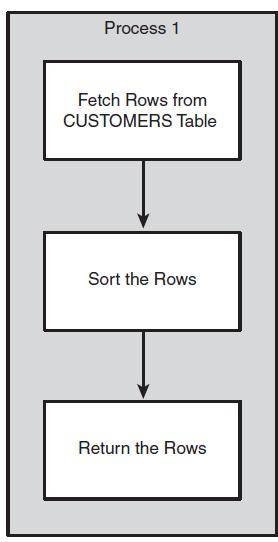
If executing without the parallel query option, a single process would be responsible for fetching all the rows in the CUSTOMERS table. The same process would be responsible for sorting the rows to satisfy the ORDER BY clause. Figure 13-1 illustrates the workflow.
We can request that Oracle execute this statement in parallel by using the PARALLEL hint:
SELECT /*+ parallel(c,2) */ *
FROM sh.customers c
ORDER BY cust_first_name, cust_last_name, cust_year_of_birth
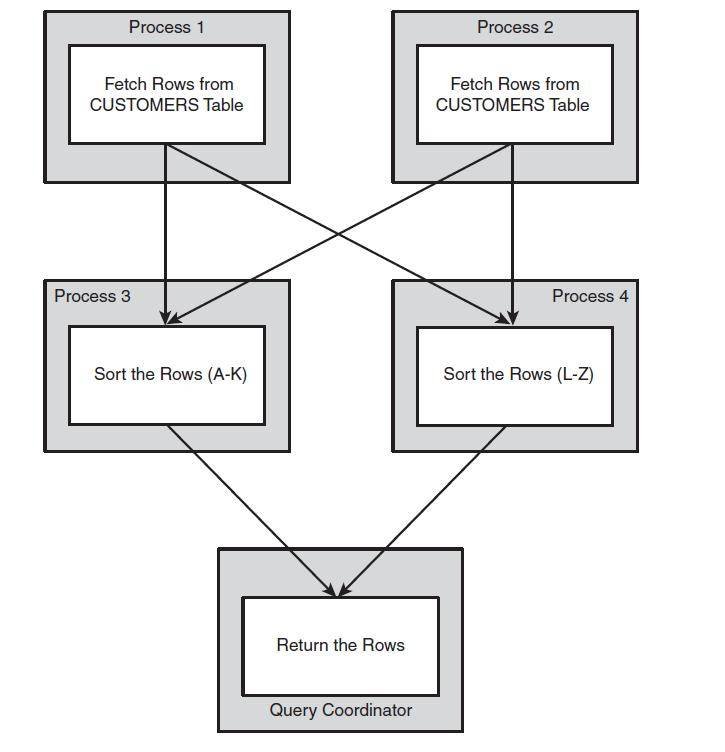
If parallel processing is available, the CUSTOMERS table will be scanned by two processes in parallel. A further two processes will be employed to sort the resulting rows. A final process—the session that issued the SQL in the first place—combines the rows and returns the result set. The process that requests and coordinates the parallel processing stream is the Query coordinator. Figure 13-2 illustrates this sequence of events.
Serial SQL statement
Figure 13-1 Serial execution of a SQL statement.
Oracle supports parallel processing for a wide range of operations, including queries, DDL, and DML:

  • Queries that involve table or index range scans
  • Bulk insert, update, or delete operations
  • Table and index creation
  • The collection of object statistics using DBMS_STATS (see Chapter 7, "Optimizing the Optimizer")
  • Backup and recovery operations using Recovery Manager (RMAN)

The Degree of Parallelism (DOP) defines the number of parallel streams of execution that will be created. In the simplest case, this translates to the number of parallel slave processes enlisted to support your SQL's execution. However, the number of parallel processes is more often twice the DOP. This is because each step in a nontrivial execution plan needs to feed data into the subsequent step, so two sets of processes are required to maintain the parallel stream of processing.
Executing parallel SQL statement with Oracle parallel hint
Figure 13-2 Parallel Execution.
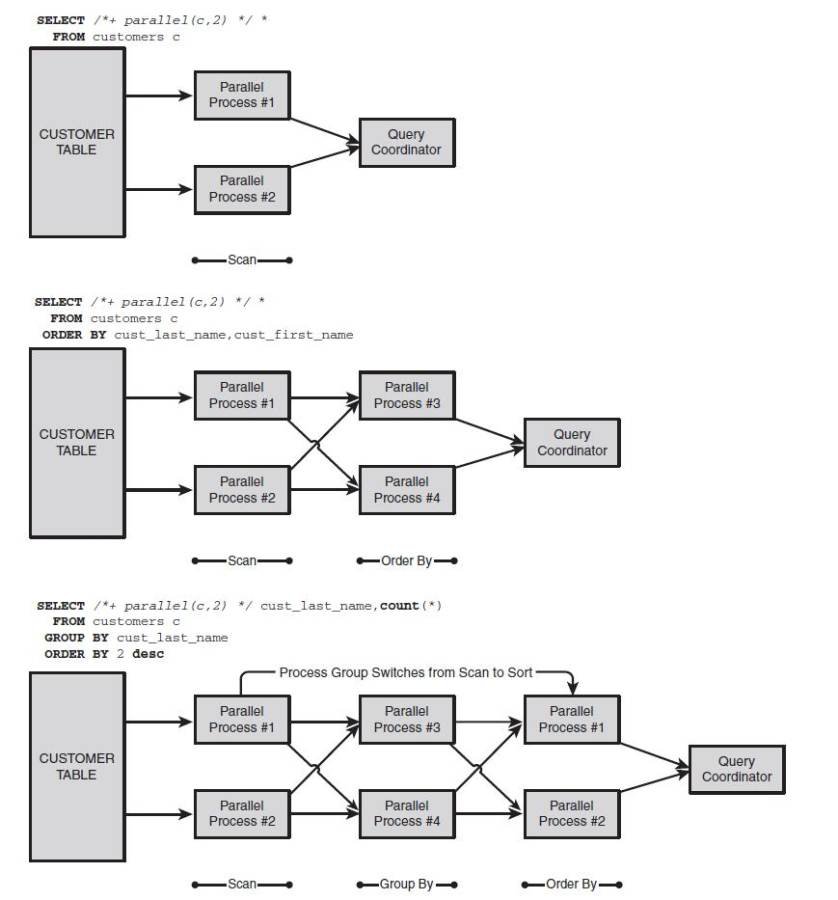
For instance, if the statement includes a full table scan, an ORDER BY and a GROUP BY, three sets of parallel processes are required: one to scan, one to sort, and one go group. Because Oracle reuses the first set of parallel processes (those that performed the scan) to perform the third operation (the GROUP BY), only two sets of processes are required. As a result of this approach, the number of parallel slaves allocated should never be more than twice the DOP.
Figure 13-3 shows how parallel slaves are allocated for a DOP of 2.
Parallel slave pool
The Oracle server maintains a pool of parallel slave processes available for parallel operations. The database configuration parameters PARALLEL_MIN_ SERVERS
Oracle parallel process allocation
Figure 13-3 Parallel process allocation for a DOP of 2.
and PARALLEL_MAX_SERVERS determine the initial and maximum size of the pool. If insufficient slaves are currently active but the pool has not reached its maximum value, Oracle will create more slaves. After a configurable period of inactivity, slave processes will shut down until the pool is again at its minimum size.
If there are insufficient query processes to satisfy the DOP requested by your statement, one of the following outcomes results:
  • If there are some parallel query slaves available, but less than requested by your SQL statement, your statement might run at a reduced DOP.
  • If there are no parallel query slaves available, your statement might run serially.
  • Under specific circumstances, you might get an error. This will only occur if the database parameter PARALLEL_MIN_PERCENT has been set to a value that is higher than the percentage of required slaves that are available.
  • In Oracle 11g Release 2 and forward, your SQL execution might be delayed until sufficient parallel servers are available.
See the "Parallel Configuration Parameters" section later in this chapter for more information on how to configure these outcomes.
Parallel Query IO
We discussed in Chapter 2, "Oracle Architecture and Concepts," and elsewhere, how the Oracle buffer cache helps reduce disk IO by buffering frequently accessed data blocks in shared memory. Oracle has an alternate IO mechanism, direct path IO, which it can use if it determines that it would be faster to bypass the buffer cache and perform the IO directly. For instance, Oracle uses direct IO when reading and writing temporary segments for sorting and intermediate result sets. In Oracle 11g onward, Oracle sometimes uses direct path IO in preference to the normal buffered IO for serial table access as well.
When performing Parallel query operations, Oracle normally uses direct path IO. By using direct path IO, Oracle avoids creating contention for the buffer cache and allows IO to be more optimally distributed between slaves. Furthermore, for parallel operations that perform full table scans the chance of finding matching data in the buffer cache is fairly low, so the buffer cache adds little value.
In Oracle 10g and earlier, parallel query always uses direct path IO, and serial query will always use buffered IO. In 11g, Oracle can use buffered IO for parallel query (from 11g release 2 forward), and serial queries might use direct path IO. However, it remains true that parallel queries are less likely to use buffered IO and might, therefore, have a higher IO cost than serial queries. The higher IO cost will, of course, be shared amongst all the parallel processes so the overall performance might still be superior.
Direct path and buffered IO are discussed in more detail within Chapter 21, "Disk IO Tuning Fundamentals."
Parallel performance gains
The performance improvements that you can expect to obtain from parallel SQL depend on the suitability of your host computer, Oracle configuration, and the SQL statement. If all the conditions for parallel processing are met, you can expect to get substantial performance improvements in proportion to the DOP employed.
On many systems, the limit of effective parallelism will be determined by segment spread, not by hardware configuration. For instance, if you have 32 CPUs and 64 independent disk devices, you might hope for effective parallelism up to at least a DOP of 32 or maybe even 64. However, if the table you are querying is spread over only 6 disks, you are likely to see performance improvements reduce as you increase the DOP beyond 6 or so.
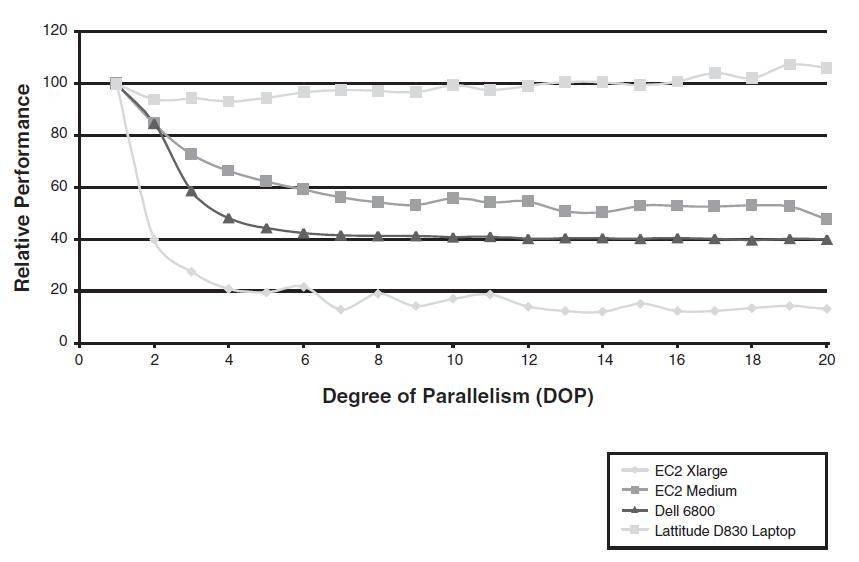
Figure 13-4 illustrates the improvements gained when increasing the DOP for a SQL statement that performs a table scan and GROUP BY of a single table.
Increasing DOP for a SQL statement
Figure 13-4 Improvement gains for various DOPs on various host configurations.
The host configurations shown are
  • An Amazon CPU-intensive Extra Large EC2 image. This is a virtual server running in Amazon's AWS cloud that has the equivalent of 8 _ 2.5-GHz CPUs and has storage on a widely striped SAN.
  • An Amazon CPU-intensive Medium EC2 image. This is similar to the extra large image, but has only 2 CPUs.
  • A Dell 6800 4 CPU server with disk storage on a widely striped SAN using ASM.
  • A Dell latitude D830 laptop (my laptop). It is dual core, but all data files are on a single disk.
In each case, the parallel SQL was the only SQL running.
These examples show that for suitably configured systems, performance gains were greater the more CPUs that were available. However, attempting to use parallel on a host that is unsuitable (as in my laptop) is futile at best and counter-productive at worst.
The performance gains achieved through parallal processing are most dependent on the hardware configuration of the host. To get benefits from parallel processing, the host should possess multiple CPUs and data should be spread across multiple disk devices.


Sunday, 12 October 2014

TKPROF Utility

1) TKPROF is an utility and a unix command to format Raw trace file which is huge in size. It essentially formats a trace file into a more readable format for performance analysis.

2) Trace files are placed by Oracle in user_dump_dest directory as specified in the init.ora
Use below query to find the location of trace files
select value from v$parameter
where name = 'user_dump_dest';


3) Use the following Unix command on the server:
TKPROF tracefile exportfile [explain=username/password] [table= …] [print= ] [insert= ] [sys= ] [record=..] [sort= ]

Eg- tkprof ora_12345.trc output.txt explain=scott/tiger sort=(prsela,exeela,fchela)
Here Sort is on elapsed parse time, elapsed executed time and elapsed fetch-time.

Tuesday, 7 October 2014

Bulk Processing with BULK COLLECT and FORALL

In this article, I will cover the two most important of these features: BULK COLLECT and FORALL.
·        BULK COLLECT: SELECT statements that retrieve multiple rows with a single fetch, improving the speed of data retrieval

·        FORALL: INSERTs, UPDATEs, and DELETEs that use collections to change multiple rows of data very quickly

Context Switches and Performance
Almost every program PL/SQL developers write includes both PL/SQL and SQL statements. PL/SQL statements are run by the PL/SQL statement executor; SQL statements are run by the SQL statement executor. When the PL/SQL runtime engine encounters a SQL statement, it stops and passes the SQL statement over to the SQL engine. The SQL engine executes the SQL statement and returns information back to the PL/SQL engine (see Figure 1). This transfer of control is called a context switch, and each one of these switches incurs overhead that slows down the overall performance of your programs.
o52plsql-f1

Figure 1: Switching between PL/SQL and SQL engines

Let’s look at a concrete example to explore context switches more thoroughly and identify the reason that FORALL and BULK COLLECT can have such a dramatic impact on performance.
Suppose my manager asked me to write a procedure that accepts a department ID and a salary percentage increase and gives everyone in that department a raise by the specified percentage. Taking advantage of PL/SQL’s elegant cursor FOR loop and the ability to call SQL statements natively in PL/SQL, I come up with the code in Listing 1.
Code Listing 1: increase_salary procedure with FOR loop 
PROCEDURE increase_salary (
   department_id_in   IN employees.department_id%TYPE,
   increase_pct_in    IN NUMBER)
IS
BEGIN
   FOR employee_rec
      IN (SELECT employee_id
            FROM employees
           WHERE department_id =
                    increase_salary.department_id_in)
   LOOP
      UPDATE employees emp
         SET emp.salary = emp.salary +
             emp.salary * increase_salary.increase_pct_in
       WHERE emp.employee_id = employee_rec.employee_id;
   END LOOP;
END increase_salary;

Suppose there are 100 employees in department 15. When I execute this block, 
BEGIN
   increase_salary (15, .10);
END;

the PL/SQL engine will “switch” over to the SQL engine 100 times, once for each row being updated. Tom Kyte, of AskTom (asktom.oracle.com), refers to row-by-row switching like this as “slow-by-slow processing,” and it is definitely something to be avoided.
I will show you how you can use PL/SQL’s bulk processing features to escape from “slow-by-slow processing.” First, however, you should always check to see if it is possible to avoid the context switching between PL/SQL and SQL by doing as much of the work as possible within SQL.
Take another look at the increase_salary procedure. The SELECT statement identifies all the employees in a department. The UPDATE statement executes for each of those employees, applying the same percentage increase to all. In such a simple scenario, a cursor FOR loop is not needed at all. I can simplify this procedure to nothing more than the code in Listing 2.
Code Listing 2: Simplified increase_salary procedure without FOR loop 
PROCEDURE increase_salary (
   department_id_in   IN employees.department_id%TYPE,
   increase_pct_in    IN NUMBER)
IS
BEGIN
   UPDATE employees emp
      SET emp.salary =
               emp.salary
             + emp.salary * increase_salary.increase_pct_in
    WHERE emp.department_id =
             increase_salary.department_id_in;
END increase_salary;

Now there is just a single context switch to execute one UPDATE statement. All the work is done in the SQL engine.
Of course, in most real-world scenarios, life—and code—is not so simple. We often need to perform other steps prior to execution of our data manipulation language (DML) statements. Suppose that, for example, in the case of the increase_salary procedure, I need to check employees for eligibility for the increase in salary and if they are ineligible, send an e-mail notification. My procedure might then look like the version in Listing 3.
Code Listing 3: increase_salary procedure with eligibility checking added 
PROCEDURE increase_salary (
   department_id_in   IN employees.department_id%TYPE,
   increase_pct_in    IN NUMBER)
IS
   l_eligible   BOOLEAN;
BEGIN
   FOR employee_rec
      IN (SELECT employee_id
            FROM employees
           WHERE department_id =
                    increase_salary.department_id_in)
   LOOP
      check_eligibility (employee_rec.employee_id,
                         increase_pct_in,
                         l_eligible);

      IF l_eligible
      THEN
         UPDATE employees emp
            SET emp.salary =
                     emp.salary
                   +   emp.salary
                     * increase_salary.increase_pct_in
          WHERE emp.employee_id = employee_rec.employee_id;
      END IF;
   END LOOP;
END increase_salary;

I can no longer do everything in SQL, so am I then resigned to the fate of “slow-by-slow processing”? Not with BULK COLLECT and FORALL in PL/SQL.
Bulk Processing in PL/SQL
The bulk processing features of PL/SQL are designed specifically to reduce the number of context switches required to communicate from the PL/SQL engine to the SQL engine.
Use the BULK COLLECT clause to fetch multiple rows into one or more collections with a single context switch.
Use the FORALL statement when you need to execute the same DML statement repeatedly for different bind variable values. The UPDATE statement in the increase_salary procedure fits this scenario; the only thing that changes with each new execution of the statement is the employee ID.
I will use the code in Listing 4 to explain how these features affect context switches and how you will need to change your code to take advantage of them.
Code Listing 4: Bulk processing for the increase_salary procedure 
1  CREATE OR REPLACE PROCEDURE increase_salary (
 2     department_id_in   IN employees.department_id%TYPE,
 3     increase_pct_in    IN NUMBER)
 4  IS
 5     TYPE employee_ids_t IS TABLE OF employees.employee_id%TYPE
 6             INDEX BY PLS_INTEGER;
 7     l_employee_ids   employee_ids_t;
 8     l_eligible_ids   employee_ids_t;
 9
10     l_eligible       BOOLEAN;
11  BEGIN
12     SELECT employee_id
13       BULK COLLECT INTO l_employee_ids
14       FROM employees
15      WHERE department_id = increase_salary.department_id_in;
16
17     FOR indx IN 1 .. l_employee_ids.COUNT
18     LOOP
19        check_eligibility (l_employee_ids (indx),
20                           increase_pct_in,
21                           l_eligible);
22
23        IF l_eligible
24        THEN
25           l_eligible_ids (l_eligible_ids.COUNT + 1) :=
26              l_employee_ids (indx);
27        END IF;
28     END LOOP;
29
30     FORALL indx IN 1 .. l_eligible_ids.COUNT
31        UPDATE employees emp
32           SET emp.salary =
33                    emp.salary
34                  + emp.salary * increase_salary.increase_pct_in
35         WHERE emp.employee_id = l_eligible_ids (indx);
36  END increase_salary;

Lines
Description
5–8
Declare a new nested table type and two collection variables based on this type. One variable, l_employee_ids, will hold the IDs of all employees in the department. The other, l_eligible_ids, will hold the IDs of all those employees who are eligible for the salary increase.
12–15
Use BULK COLLECT to fetch all the IDs of employees in the specified department into the l_employee_ids collection.
17–28
Check for salary increase eligibility: If ineligible, an e-mail is sent. (Note: Implementation of check_eligibility is not included in this article.) If eligible, add the ID to the l_eligible_ids collection.
30–35
Use a FORALL statement to update all the rows identified by employee IDs in the l_eligible_ids collection.
Listing 4 also contains an explanation of the code in this new-and-improved increase_salary procedure. There are three phases of execution: 
1.      Fetch rows with BULK COLLECT into one or more collections. A single context switch is needed for this step.
2.      Modify the contents of collections as required (in this case, remove ineligible employees).
3.      Change the table with FORALL using the modified collections. 
Rather than move back and forth between the PL/SQL and SQL engines to update each row, FORALL “bundles up” all the updates and passes them to the SQL engine with a single context switch. The result is an extraordinary boost in performance. 
I will first explore BULK COLLECT in more detail, and then cover FORALL.
About BULK COLLECT
To take advantage of bulk processing for queries, you simply put BULK COLLECT before the INTO keyword and then provide one or more collections after the INTO keyword. Here are some things to know about how BULK COLLECT works: 
·        It can be used with all three types of collections: associative arrays, nested tables, and VARRAYs.
·        You can fetch into individual collections (one for each expression in the SELECT list) or a single collection of records.
·        The collection is always populated densely, starting from index value 1.
·        If no rows are fetched, then the collection is emptied of all elements.
Listing 5 demonstrates an example of fetching values for two columns into a collection of records.
Code Listing 5: Fetching values for two columns into a collection 
DECLARE
   TYPE two_cols_rt IS RECORD
   (
      employee_id   employees.employee_id%TYPE,
      salary        employees.salary%TYPE
   );

   TYPE employee_info_t IS TABLE OF two_cols_rt;

   l_employees   employee_info_t;
BEGIN
   SELECT employee_id, salary
     BULK COLLECT INTO l_employees
     FROM employees
    WHERE department_id = 10;
END;

If you are fetching lots of rows, the collection that is being filled could consume too much session memory and raise an error. To help you avoid such errors, Oracle Database offers a LIMIT clause for BULK COLLECT. Suppose that, for example, there could be tens of thousands of employees in a single department and my session does not have enough memory available to store 20,000 employee IDs in a collection.
Instead I use the approach in Listing 6.
Code Listing 6: Fetching up to the number of rows specified 
DECLARE
   c_limit PLS_INTEGER := 100;

   CURSOR employees_cur
   IS
      SELECT employee_id
        FROM employees
       WHERE department_id = department_id_in;

   TYPE employee_ids_t IS TABLE OF
      employees.employee_id%TYPE;

   l_employee_ids   employee_ids_t;
BEGIN
   OPEN employees_cur;

   LOOP
      FETCH employees_cur
      BULK COLLECT INTO l_employee_ids
      LIMIT c_limit;

      EXIT WHEN l_employee_ids.COUNT = 0;
   END LOOP;
END;

With this approach, I open the cursor that identifies all the rows I want to fetch. Then, inside a loop, I use FETCH-BULK COLLECT-INTO to fetch up to the number of rows specified by the c_limit constant (set to 100). Now, no matter how many rows I need to fetch, my session will never consume more memory than that required for those 100 rows, yet I will still benefit from the improvement in performance of bulk querying.
About FORALL
Whenever you execute a DML statement inside of a loop, you should convert that code to use FORALL. The performance improvement will amaze you and please your users.
The FORALL statement is not a loop; it is a declarative statement to the PL/SQL engine: “Generate all the DML statements that would have been executed one row at a time, and send them all across to the SQL engine with one context switch.”
As you can see in Listing 4, lines 30 through 35, the “header” of the FORALL statement looks just like a numeric FOR loop, yet there are no LOOP or END LOOP keywords.
Here are some things to know about FORALL:
·        Each FORALL statement may contain just a single DML statement. If your loop contains two updates and a delete, then you will need to write three FORALL statements.
·        PL/SQL declares the FORALL iterator (indx on line 30 in Listing 4) as an integer, just as it does with a FOR loop. You do not need to—and you should not—declare a variable with this same name.
·        In at least one place in the DML statement, you need to reference a collection and use the FORALL iterator as the index value in that collection (see line 35 in Listing 4).
·        When using the IN low_value . . . high_value syntax in the FORALL header, the collections referenced inside the FORALL statement must be densely filled. That is, every index value between the low_value and high_value must be defined.
·        If your collection is not densely filled, you should use the INDICES OF or VALUES OF syntax in your FORALL header. 
FORALL and DML Errors
Suppose that I’ve written a program that is supposed to insert 10,000 rows into a table. After inserting 9,000 of those rows, the 9,001st insert fails with a DUP_VAL_ON_INDEX error (a unique index violation). The SQL engine passes that error back to the PL/SQL engine, and if the FORALL statement is written like the one in Listing 4, PL/SQL will terminate the FORALL statement. The remaining 999 rows will not be inserted.
If you want the PL/SQL engine to execute as many of the DML statements as possible, even if errors are raised along the way, add the SAVE EXCEPTIONS clause to the FORALL header. Then, if the SQL engine raises an error, the PL/SQL engine will save that information in a pseudocollection named SQL%BULK_EXCEPTIONS, and continue executing statements. When all statements have been attempted, PL/SQL then raises the ORA-24381 error.
You can—and should—trap that error in the exception section and then iterate through the contents of SQL%BULK_EXCEPTIONS to find out which errors have occurred. You can then write error information to a log table and/or attempt recovery of the DML statement.
Listing 7 contains an example of using SAVE EXCEPTIONS in a FORALL statement; in this case, I simply display on the screen the index in the l_eligible_ids collection on which the error occurred, and the error code that was raised by the SQL engine.
Code Listing 7: Using SAVE EXCEPTIONS with FORALL 
BEGIN
   FORALL indx IN 1 .. l_eligible_ids.COUNT SAVE EXCEPTIONS
      UPDATE employees emp
         SET emp.salary =
                emp.salary + emp.salary * increase_pct_in
       WHERE emp.employee_id = l_eligible_ids (indx);
EXCEPTION
   WHEN OTHERS
   THEN
      IF SQLCODE = -24381
      THEN
         FOR indx IN 1 .. SQL%BULK_EXCEPTIONS.COUNT
         LOOP
            DBMS_OUTPUT.put_line (
                  SQL%BULK_EXCEPTIONS (indx).ERROR_INDEX
               || ‘: ‘
               || SQL%BULK_EXCEPTIONS (indx).ERROR_CODE);
         END LOOP;
      ELSE
         RAISE;
      END IF;
END increase_salary;

From SQL to PL/SQL
This article talks mostly about the context switch from the PL/SQL engine to the SQL engine that occurs when a SQL statement is executed from within a PL/SQL block. It is important to remember that a context switch also takes place when a user-defined PL/SQL function is invoked from within an SQL statement.
Suppose that I have written a function named betwnstr that returns the string between a start and end point. Here’s the header of the function: 
FUNCTION betwnstr (
   string_in      IN   VARCHAR2
 , start_in       IN   INTEGER
 , end_in         IN   INTEGER
)
   RETURN VARCHAR2

I can then call this function as follows: 
SELECT betwnstr (last_name, 2, 6)
  FROM employees
 WHERE department_id = 10

If the employees table has 100 rows and 20 of those have department_id set to 10, then there will be 20 context switches from SQL to PL/SQL to run this function.
You should, consequently, play close attention to all invocations of user-defined functions in SQL, especially those that occur in the WHERE clause of the statement. Consider the following query: 
SELECT employee_id
  FROM employees
 WHERE betwnstr (last_name, 2, 6) = 'MITHY'

In this query, the betwnstr function will be executed 100 times—and there will be 100 context switches.

FORALL with Sparse Collections
If you try to use the IN low_value .. high_value syntax with FORALL and there is an undefined index value within that range, Oracle Database will raise the “ORA-22160: element at index [N] does not exist” error.
To avoid this error, you can use the INDICES OF or VALUES OF clauses. To see how these clauses can be used, let’s go back to the code in Listing 4. In this version of increase_salary, I declare a second collection, l_eligible_ids, to hold the IDs of those employees who are eligible for a raise.
Instead of doing that, I can simply removeall ineligible IDs from the l_employee_ids collection, as follows: 
   FOR indx IN 1 .. l_employee_ids.COUNT
   LOOP
      check_eligibility (l_employee_ids (indx),
                         increase_pct_in,
                         l_eligible);

      IF NOT l_eligible
      THEN
         l_employee_ids.delete (indx);
      END IF;
   END LOOP;

But now my l_employee_ids collection may have gaps in it: index values that are undefined between 1 and the highest index value populated by the BULK COLLECT.
No worries. I will simply change my FORALL statement to the following: 
FORALL indx IN INDICES OF l_employee_ids
   UPDATE employees emp
      SET emp.salary =
               emp.salary
             + emp.salary *
                increase_salary.increase_pct_in
    WHERE emp.employee_id =
      l_employee_ids (indx);

Now I am telling the PL/SQL engine to use only those index values that are defined in l_employee_ids, rather than specifying a fixed range of values. Oracle Database will simply skip any undefined index values, and the ORA-22160 error will not be raised.
This is the simplest application of INDICES OF. Check the documentation for more-complex usages of INDICES OF, as well as when and how to use VALUES OF.
Bulk Up Your Code!
Optimizing the performance of your code can be a difficult and time-consuming task. It can also be a relatively easy and exhilarating experience—if your code has not yet been modified to take advantage of BULK COLLECT and FORALL. In that case, you have some low-hanging fruit to pick!    
Take the Challenge

Each PL/SQL 101 article offers a quiz to test your knowledge of the information provided in it. The quiz appears below and also at PL/SQL Challenge, a Website that offers online quizzes on the PL/SQL language as well as SQL and Oracle Application Express. 

I create and populate my employees table as follows:
CREATE TABLE plch_employees
(
   employee_id   INTEGER,
   last_name     VARCHAR2 (100)
)
/

BEGIN
   INSERT INTO plch_employees
        VALUES (100, ‘Picasso’);

   INSERT INTO plch_employees
        VALUES (200, ‘Mondrian’);

   INSERT INTO plch_employees
        VALUES (300, ‘O’’Keefe’);

   COMMIT;
END;
/


Question
Which of these blocks will uppercase the last names of all employees in the table?

a.
DECLARE
   TYPE ids_t IS TABLE OF plch_employees.employee_id%TYPE;

   l_ids   ids_t := ids_t (100, 200, 300);
BEGIN
   FORALL indx IN 1 .. l_ids.COUNT
   LOOP
      UPDATE plch_employees
         SET last_name = UPPER (last_name)
       WHERE employee_id = l_ids (indx);
   END LOOP;       
END;
/

b.
DECLARE
   TYPE ids_t IS TABLE OF plch_employees.employee_id%TYPE;

   l_ids   ids_t := ids_t (100, 200, 300);
BEGIN
   FORALL indx IN 1 .. l_ids.COUNT
      UPDATE plch_employees
         SET last_name = UPPER (last_name)
       WHERE employee_id = l_ids (indx);
END;
/

c.
BEGIN
   UPDATE plch_employees
       SET last_name = UPPER (last_name);
END;
/
d.
 DECLARE
   TYPE ids_t IS TABLE OF plch_employees.employee_id%TYPE;

   l_ids   ids_t := ids_t (100, 200, 300);
BEGIN
   FORALL indx IN INDICES OF l_ids
      UPDATE plch_employees
         SET last_name = UPPER (last_name)
       WHERE employee_id = l_ids (indx);
END;
/